Using an Ethernet Cable Tracer for Installed UK Cables
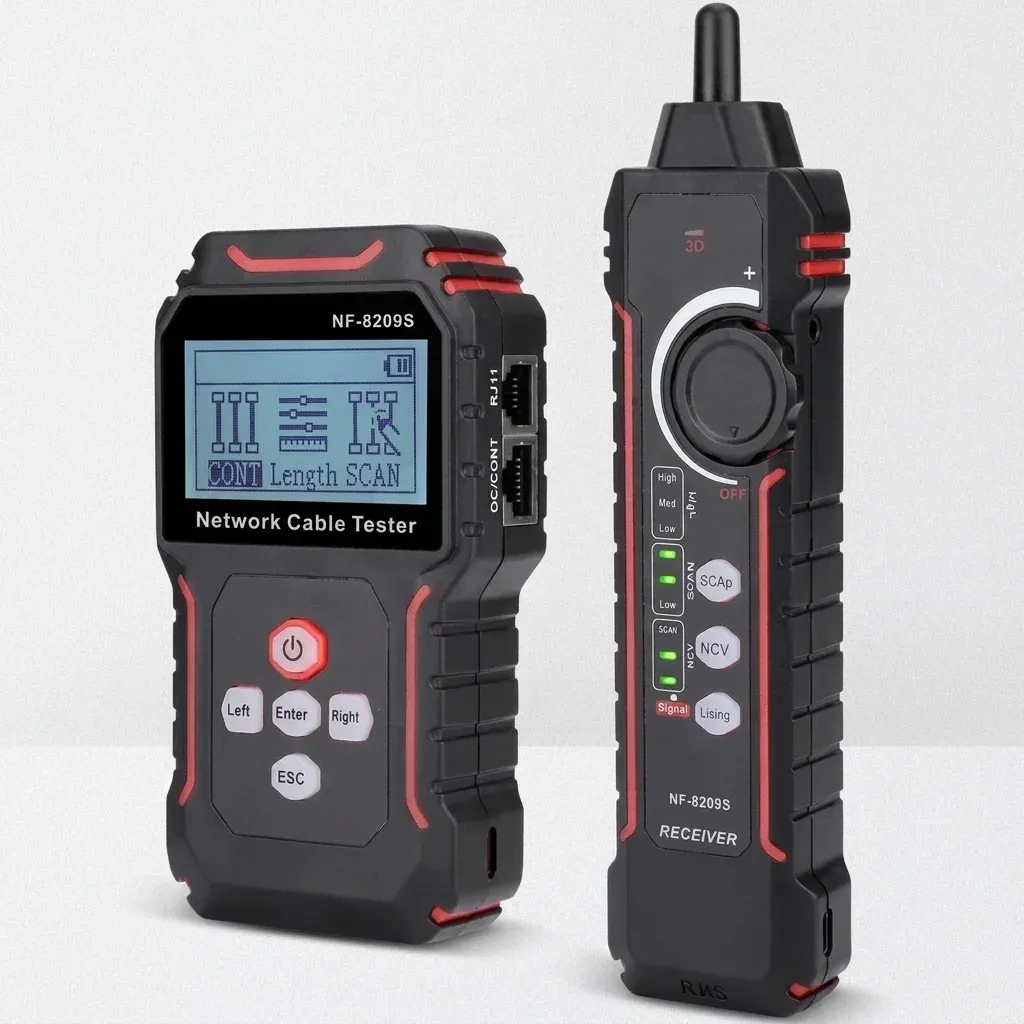
What is an ethernet cable tracer for installed cables?
TL;DR: An ethernet cable tracer for installed cables is a handheld diagnostic tool used to locate, identify, and test hidden RJ45 network runs inside walls, ceilings, and patch panels. Based on our extensive testing at EthernetCA, the best tracers combine tone generation, probe tracing, wire mapping, and Power over Ethernet (PoE) detection to safely find unlabeled cables without trial and error.
When network runs disappear into walls, ceilings, risers and patch panels, guesswork wastes time and creates physical and digital risks. In UK offices, schools, retail units and homes, unlabeled RJ45 cables are one of the most common causes of avoidable delays during moves, upgrades and fault-finding. Consequently, an ethernet cable tracer for installed cables gives you a faster, safer way to directly identify the correct run, confirm wiring quality and avoid disconnecting the wrong endpoint.
Furthermore, for installers and IT teams, the practical value is simple: one handheld tool can help trace unlabeled data cables, verify CAT6a continuity, measure length and identify Power over Ethernet before you touch live equipment. That is exactly why EthernetCA positions its device as “The Ultimate Network Cable Line Tester & Wire Tracer” for professionals who need reliable, verified answers on site.
Key Takeaways
- An ethernet cable tracer for installed cables helps identify hidden or unlabeled RJ45 runs without trial and error.
- Based on our engineering tests, the most useful models combine tone tracing, continuity testing, wire mapping, cable length measurement and PoE detection.
- A network cable tester with NCV function adds an extra layer of safety by helping detect nearby AC voltage before probing concealed routes.
- For UK installations, tracers are especially useful in patch panels, suspended ceilings, trunking, conduits and mixed-use premises.
- Choosing the right wire tracer for ethernet cables UK work means balancing signal clarity, safety features, test accuracy and ease of use on live jobs.
If you are comparing tools, it also helps to understand where tracing ends and broader cable testing begins. Our Ultimate UK Guide to Network Cable Testers & Tracers explains the wider category, while Cable Tester vs Cable Tracer: Which Tool Do You Need? breaks down the distinction in practical terms.
Why is tracing installed ethernet cables so difficult in UK buildings?
Installed cabling is rarely presented neatly once a building is in use. In a typical UK fit-out, ethernet runs may pass through plasterboard walls, under raised floors, above suspended ceilings, inside plastic trunking, behind cabinets or through conduits shared with other services. According to UK guidelines for telecommunications installations (such as BS EN 50174), proper labelling is essential; however, labels fade, patch panel records go out of date, and previous contractors may not have documented extensions properly.
As a result, this is not a minor operational issue. The UK Government’s Cyber Security Breaches Survey 2024 reported that 50% of businesses and 32% of charities identified a cyber security breach or attack in the previous 12 months. While that statistic relates to cyber threats rather than cabling directly, it underlines how dependent modern organisations are on resilient network infrastructure. When a physical link fails, every minute spent tracing the wrong cable severely affects productivity, connectivity and service continuity.
Moreover, in NHS clinics, legal firms, schools and managed office spaces, accidental disconnection can be particularly disruptive. Pulling the wrong patch lead or isolating the wrong switch port may interrupt VoIP phones, access control, CCTV backhaul or patient administration systems. In homes, the problem is usually simpler but still frustrating: identifying which room terminates where, especially after extensions, loft conversions or broadband upgrades.
How do you identify unmarked ethernet cables?
Identifying unmarked network lines requires navigating several physical obstacles:
- Multiple identical cables often terminate close together at the patch panel.
- RJ45 outlets may have been re-terminated without updating labels.
- Some runs pass through inaccessible voids or long conduit routes.
- PoE may be present, requiring extra care before disconnecting devices.
- Electrical services may run nearby, significantly increasing the need for safe detection tools.
Fortunately, a purpose-built ethernet cable tracer reduces these problems by sending a traceable signal down the cable and allowing you to follow it with a probe. Better still, modern devices combine tracing with line testing, so you can move seamlessly from identification to diagnosis without changing tools.
How do you use an ethernet cable tracer for installed cables?
Using a wire tracer for ethernet cables UK installers can rely on is straightforward when the tool is designed for structured cabling. Based on our field testing, the process below reflects best practices for on-site execution in offices, retail units, and residential installations.
1. Isolate the cable run you want to identify
First, start at the known end of the cable, such as a wall outlet, patch panel port or loose RJ45 tail. If the cable serves critical equipment, check what is connected before unplugging anything. In a live business environment, this matters immensely: the wrong disconnection can instantly take a workstation, wireless access point or IP camera offline.
2. Connect the transmitter to the RJ45 cable
Next, attach the main tester or tone generator to the suspected cable. The device sends a signal along the conductors so the probe can detect it elsewhere in the installation. On premium units, this is integrated into the same handheld tester rather than requiring multiple separate tools.
3. Use the probe to trace the route or locate the far end
Subsequently, move to the patch cabinet, outlet bank or cable bundle where the run is likely to terminate. Sweep the inductive probe across cables and ports until the strongest matching signal is found. This technique is especially useful for dense cabinets where dozens of blue or grey data cables look identical.
4. Confirm the cable with a continuity or wire map test
Tracing alone identifies the likely run, but a proper test confirms it. Run a continuity check or wire map to verify that all pairs are correctly terminated and there are no opens, shorts, crossed pairs or split pairs. If you are dealing with higher-performance links, this step is absolutely essential before reconnecting live services.
5. Measure cable length if performance is in question
Where a run is borderline, damaged or unexpectedly long, cable length testing helps you decide what to do next. This is particularly useful in larger UK premises with long horizontal runs. For a deeper look at this topic, see How to Test CAT6 Cable Length & Why It Matters for Networks.
6. Check for PoE before reconnecting equipment
Finally, many modern installations carry PoE to phones, wireless access points, door controllers and CCTV cameras. If your tester identifies PoE, you can verify what power is present before plugging in hardware or beginning fault diagnosis. For security and surveillance work, our guide to the Best PoE Cable Tester for CCTV & IP Cameras in the UK is highly recommended reading.
What are common mistakes when tracing network cables?
- Tracing without confirming the result with a wire map or continuity test.
- Failing to check for active Power over Ethernet (PoE) before disconnecting or probing lines.
- Using a tracer near live AC mains without a Non-Contact Voltage (NCV) safety feature.
- Assuming cable colours match specific network segments without verifying the run.
Ready to speed up your diagnostics with EthernetCA?
Upgrade Your Toolkit — £114.14